New Launch | Build AI Agents on WhatsApp that qualify & convert 24/7 · Explore More

Login
WhatsApp X ShopifyOne Click Integration

Meet the Best Shopify App for

WhatsApp Marketing 

Seamlessly connect your Shopify app with AiSensy and automate notifications for order, delivery, feedback & more on WhatsApp!

video thumbnail

Use Cases: How Shopify + AiSensy Helps Your Ecommerce Business 

Integrating your Shopify store with AiSensy doesn’t just automate messages; it unlocks real business workflows that drive sales, improve customer experience, and reduce manual support work:

cart-shopping.svg

Recover Abandoned Carts

Automate personalized WhatsApp reminders to customers who left items in their cart to complete their purchase.
truck.svg

Order Confirmation & Updates

Provide instant order confirmations, shipping updates, and delivery notifications via WhatsApp
box-open.svg

Reduce RTO (Return to Origin)

Confirm COD orders and cut down on returns with WhatsApp notifications.
pencil.svg

Feedback Collection & Reviews

Gather valuable insights to improve your products and services.
stopwatch.svg

Timely Reorder Reminders

Boost repeat purchases by proactively reminding customers to restock their favorite products.
megaphone.svg

Promotional Campaigns & Offers

Launch promotions, send offers, and drive engagement directly through WhatsApp.

Founders & Marketers Love us

Trusted by 210,000+ Businesses across 68+ Countries

WhatsApp x Shopify Flows Available in AiSensy

AiSensy organizes Shopify automations into three main flows, helping you manage the complete customer journey from cart abandonment to repeat purchase.

Abandoned Cart Flows

Set up to three automated reminders for customers who add products to their cart but do not complete checkout.

  • Abandoned Cart Flow 1
  • Abandoned Cart Flow 2
  • Abandoned Cart Flow 3

COD Flow

Verify COD orders, reduce RTO and encourage customers to switch to prepaid.

  • COD Order Confirmation
  • COD Order Follow-Up
  • COD Order Confirmed Status
  • COD Order Cancelled Status
  • COD Payment Request
  • COD Payment Reminder

Order Flow

Keep customers informed after purchase and drive repeat business.

  • Order Confirmed
  • Order Cancelled
  • Order Fulfilled
  • Order Delivered
  • Order Feedback
  • Reorder Reminder

Your whole Shopify Journey on WhatsApp!

Cart recovery, COD verification, and AI support, all in one video.

video thumbnail

Connecting Shopify with AiSensy

Step-by-Step Guide

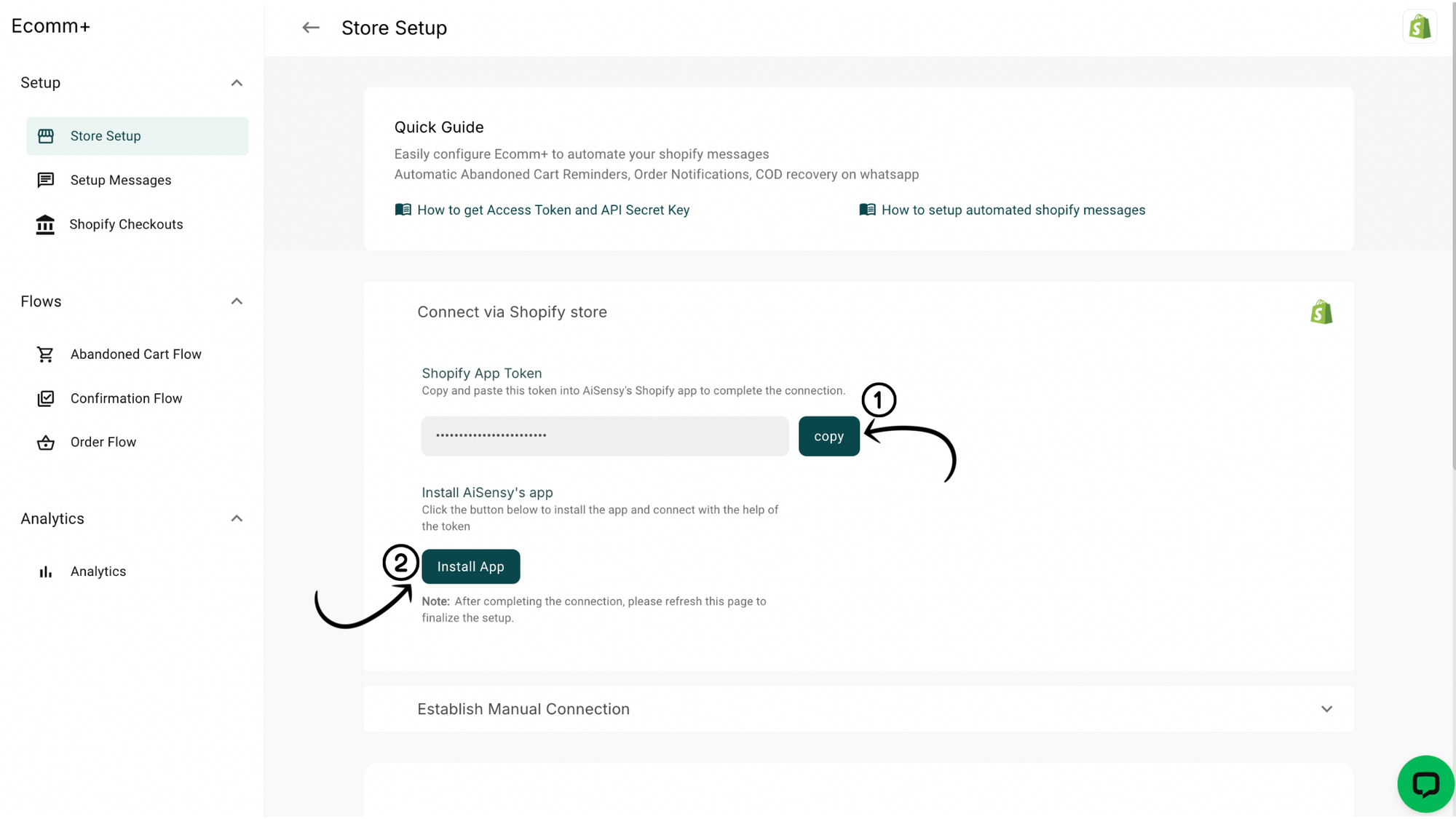
Copy Your Shopify App Token

• In your AiSensy app, go to Ecomm+ -> Shopify Store Setup.
• Tap Copy Shopify App token (you'll need this in a bit).
• Now tap Install app.
5e419ca237-afb12362bc335e84e983.png

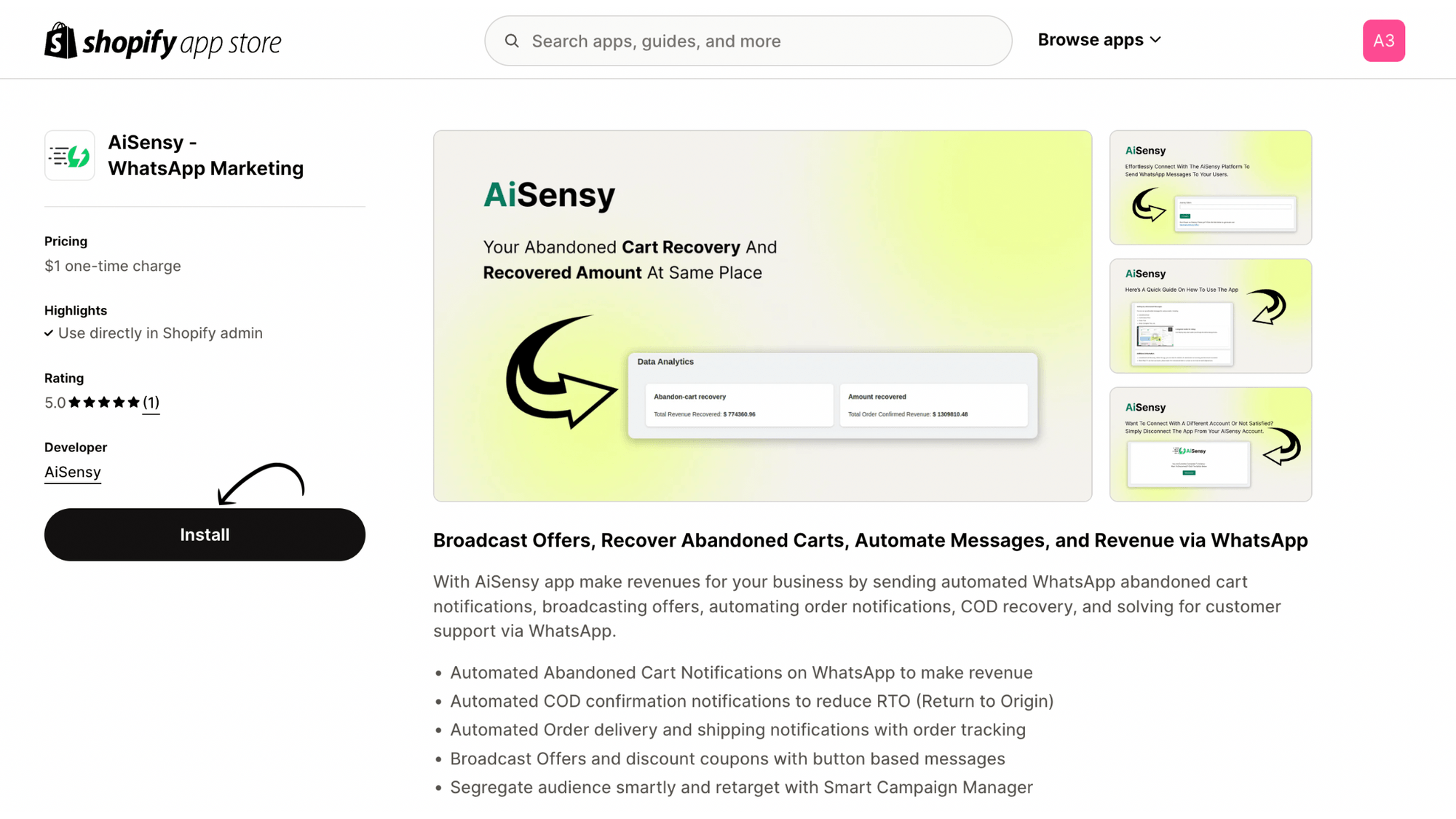
Head to the Shopify App Store

• Clicking the Install app button will take you straight to the AiSensy app in the Shopify App Store.
• Tap the Install button there.
606dbb735d-73bacdf4dfd99c26ebb5.png

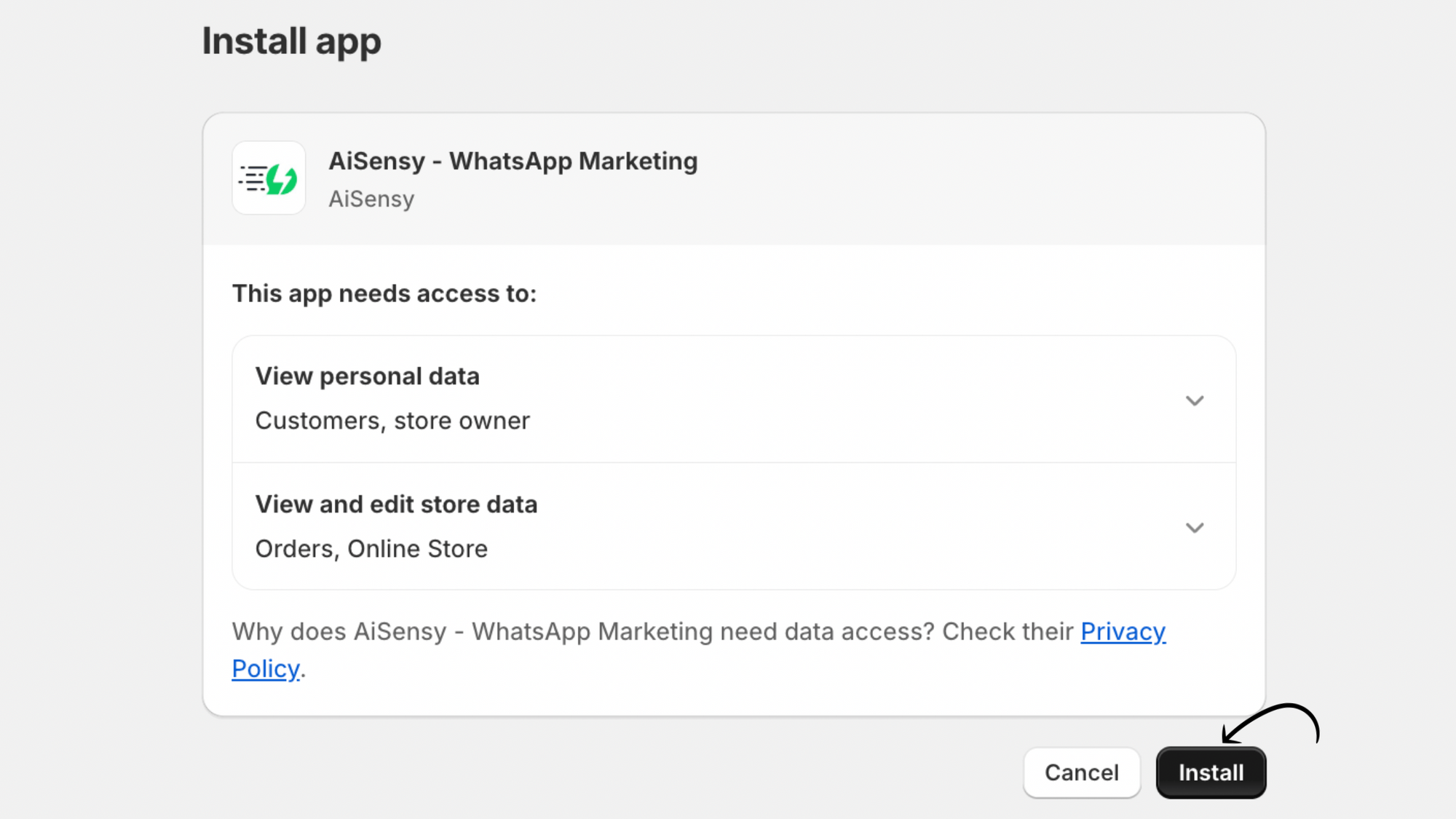
Confirm the installation

On the next screen, tap Install again to confirm.
fa16f0901b-12d05fe9ce8425656816.png

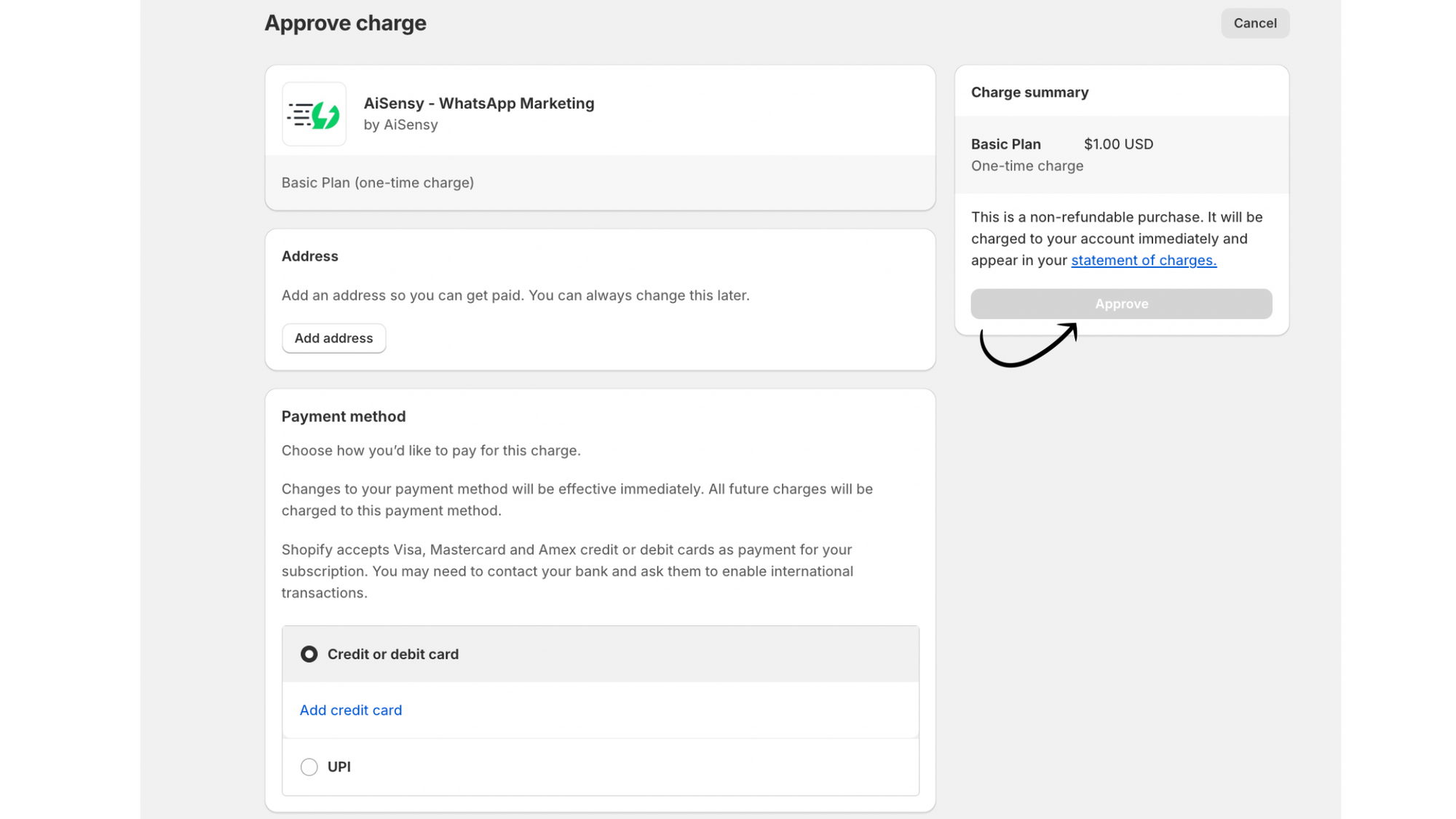
Pay a Small Setup Fee

Complete the one-time payment of $1 to proceed.
(If you prefer not to pay, check out the steps to connect manually at the link provided below).
d10e6ba41d-46e1709224bb73e6d647.png

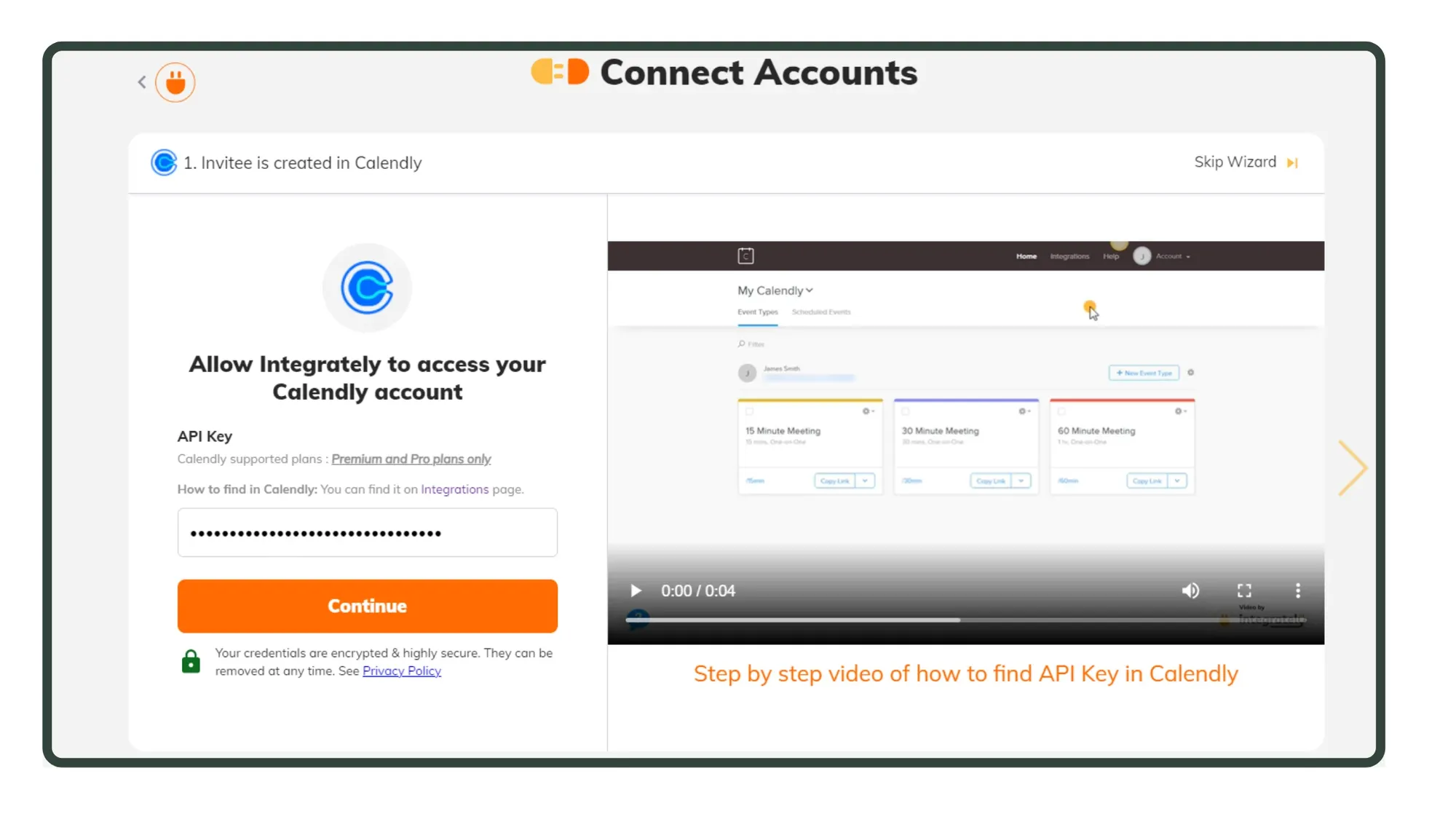
Paste the token into AiSensy and Connect

Return to the AiSensy app, paste the Shopify token you copied and click Connect.
5cff8e2866-1920c26dd7ad69a7577d.png

In AiSensy app, refresh your screen and voila! Magic Done!

Your Shopify store is now connected to AiSensy in just a few simple steps. 

Note: If you don't wish to spend the $1 setup fee, follow the steps in the link below. 
6. Paste API Key in Integrately.webp

Benefits of WhatsApp x Shopify Integration with AiSensy

Connect Shopify with WhatsApp and turn every stage of the customer journey, from cart to checkout to repeat purchase, into an automated conversation.

One-Click Integration

Connect your Shopify store to AiSensy in minutes. Install the app, paste your Shopify App Token, and your flows are ready to go live
whatsapp-shopify-integration.webp

Automate broadcast with 15 Flows

Send order confirmations, shipping updates and promotional offers directly on WhatsApp, in real time, without customers checking email.
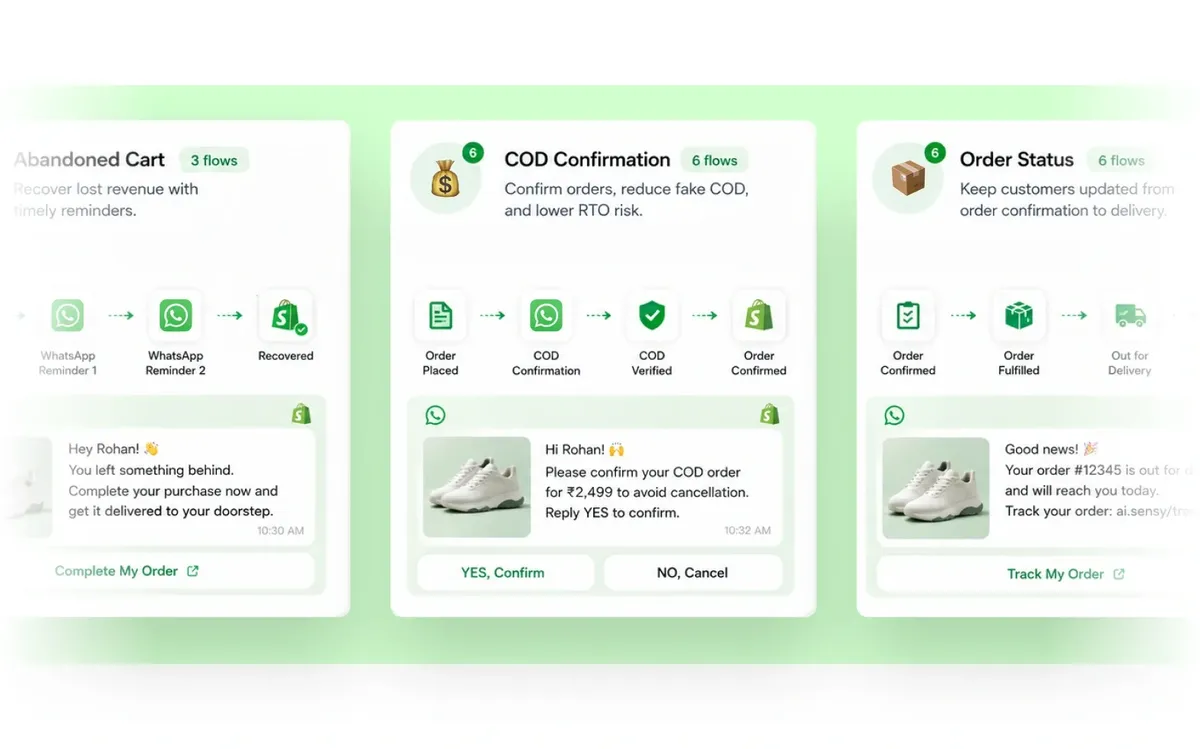
automatic-flows-shopify-whatsapp.webp

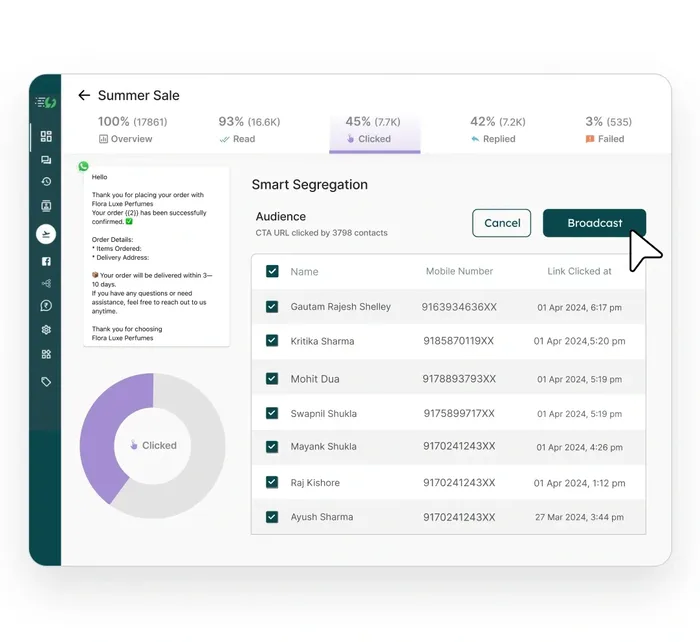
Retarget Campaigns

Segment your audience smartly and retarget shoppers on WhatsApp with Smart Campaign Manager.
smart-retargeting-for-shopify.webp

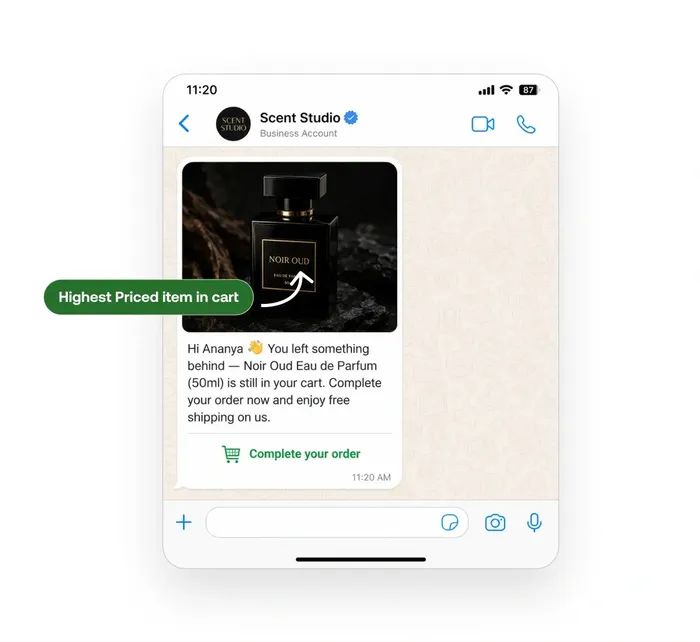
Show Dynamic Product Images

Automatically display the relevant Shopify product image in each WhatsApp message, making cart reminders and order updates more personalized.
dynamic-product-images-on-whatsapp.webp

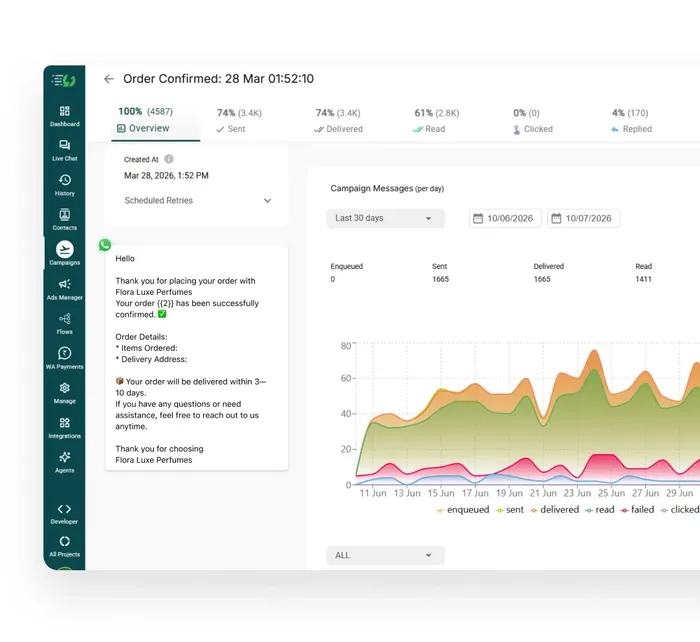
Track Performance in One Dashboard

See sent, delivered, read, clicked and replied metrics for every flow in real time from the AiSensy dashboard, so you know what to fix and what to scale.
campaign-analytics.webp

Sample WhatsApp Messages for Shopify Businesses


With the Shopify + AiSensy integration, you can automate personalized WhatsApp messages across the entire customer journey. Below are sample message templates businesses can use to get started:

Abandoned Cart Reminder

Hi {{Customer Name}} 👋
You left something behind in your cart!

🛍️ {{Product Name}}

💰 {{Price}}

Complete your purchase here before it goes out of stock:

👉 {{Checkout Link}}

Order Confirmation

Hi {{Customer Name}} 🎉
Thank you for your order! We have successfully received your purchase.

🧾 Order ID: {{Order ID}}

📦 Items: {{Product Names}}

We will notify you as soon as your order is shipped.

Shipping Update

Great news, {{Customer Name}} 🚚
Your order {{Order ID}} has been shipped!

Need help? Just reply to this message. We are here for you!

🔗 Track Your Order: {{Tracking Link}}

COD Order Confirmation

Hi {{Customer Name}},
Please confirm your Cash on Delivery order for {{Product Name}}.

This helps us deliver your order faster.

Confirm Order
Cancel Order

Order Feedback

Hi {{Customer Name}} 😊
Your order has been delivered! We would love to know how your experience was.

Your feedback helps us serve you better.

⭐ Rate Your Purchase: {{Review Link}}

Order Cancelled

Hi {{Customer Name}},
Your order {{Order ID}} has been cancelled.

💰 Refund Amount: {{Refund Amount}}

Your refund will be processed within 5 to 7 business days. We are sorry this order did not work out.

🛍️ Browse Products: {{Store Link}}

Promotional Campaign Message

🔥 Limited-Time Offer!

Get {{Discount}}% OFF on our best-selling products.

⏳ Offer valid till {{Expiry Date}}

🛍️ Shop Now: {{Store Link}}

Reorder / Upsell Message

Hi {{Customer Name}} 👋
Running low on {{Previously Purchased Product}}?

Reorder in just one click.

🎁 Enjoy an exclusive offer just for you!

👉 {{Product Link}}

Payment Reminder

Hi {{Customer Name}} 👋
This is a quick reminder to complete the payment for your order {{Order ID}}.

Complete your payment now to avoid any delay in processing.

💳 Complete Payment: {{Payment Link}}

Drive 3x Revenue with AiSensy

Get Started for FREE. No Credit Card needed.
⚡️Powered by Official WhatsApp Business API

FAQs

Frequently asked questions answered

How do I integrate Shopify with WhatsApp using AiSensy?

You can connect your Shopify store to WhatsApp via AiSensy by installing the AiSensy app from the Shopify App Store and connecting it using the Shopify App Token inside your AiSensy dashboard. Once connected, you can start automating WhatsApp notifications and campaigns for your store.

Do I need WhatsApp Business API to send Shopify notifications on WhatsApp?

For scalable automation and WhatsApp message flows, you need the WhatsApp Business API (not just the WhatsApp Business App). AiSensy helps businesses use the WhatsApp Business API for automated notifications, campaigns, and customer lifecycle messaging.

What WhatsApp messages can I automate with Shopify + AiSensy?

You can automate key ecommerce WhatsApp notifications like abandoned cart reminders, order confirmations, shipping and delivery updates, payment reminders, COD order confirmations, and post-delivery feedback requests. You can also run promotional campaigns, reorder reminders, and upsell messages.

How do I automate abandoned cart recovery on WhatsApp?

With AiSensy, you can set up abandoned cart notifications to be sent via WhatsApp. Create and approve a template message, configure the timing of the notifications, and enable the abandoned cart flow. This setup can recover up to 40% of abandoned carts.

How much technical expertise is required for the Shopify x AiSensy integration?

The integration process is straightforward and requires basic familiarity with Shopify settings. Check our step-by-step guide to make the process easy even for non-technical users.  https://wiki.aisensy.com/en/articles/11484773-connect-shopify-app-with-aisensy-in-a-snap-one-click-integration